
So I was recently migrating one of my game systems from blueprints to C++ because I needed the added performance and a few low-level functions, and I ran into what seems to be a pretty common issue that I couldn’t find a documented solution for. If you’ve done this before, you’re probably already familiar with Core Redirectors, and in this case, specifically the StructRedirects array. The issue I encountered was mildly infuriating, especially after learning the cause. Let’s dig into it.
Core Redirectors
For those who are unfamiliar, core redirectors are an Unreal Engine feature that lets you remap the names of classes, structs, properties, and packages. For the most part, they are fairly straight forward to use, and Epic’s documentation covers the topic pretty well. I’ll include a few examples that are related to the problem I ran into, all of them come straight from my project so they are confirmed working examples.
If you haven’t used core redirectors or gotten into the nitty-gritty of unreal asset packages before, you may not be familiar with the name syntax. Here are the two most common formats you’ll be working with.
/Script/GameModule.ObjectName
/Game/Path/To/Thing/ObjectName.ObjectName
In many cases, it’s totally fine to drop the package path and just use the ObjectName directly. You’ll see this a lot in the engine config files and my examples below. If you’re dealing with ambiguous names including the full path doesn’t hurt though!
If you need to get the name of something in the editor the fastest way is to right click it and hit Copy Reference.
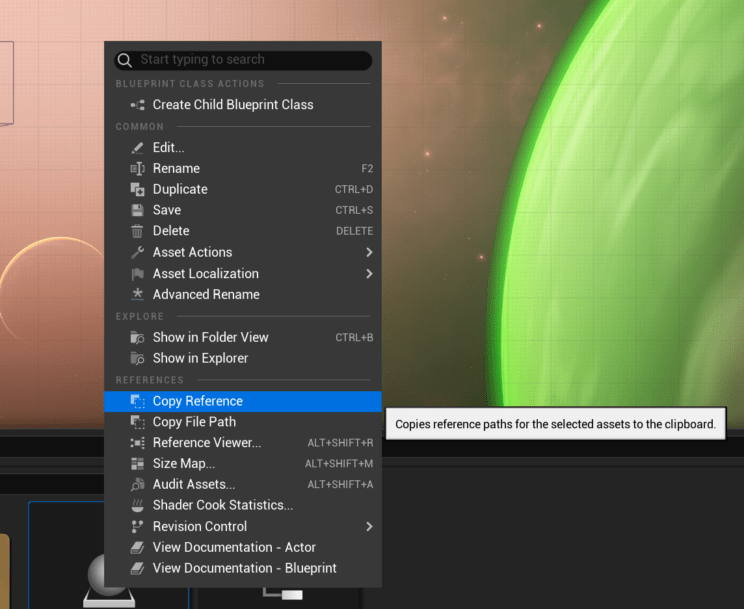
You’ll need to modify the result slightly, it gives you something like this:
/Script/Engine.Blueprint'/Game/LevelTiles/BP_LevelTileGenerator.BP_LevelTileGenerator'
What you need is the part between the quotes, you can drop the rest.
Class Redirectors
These are usually pretty straight forward, but can get a little weird when blueprints are involved. When dealing with blueprints you need to add _C to the name of the object, so BP_LevelTileData becomes BP_LevelTileData_C, and you need to override the class name to be a CoreUObject instead of BlueprintGeneratedClass.
+ClassRedirects=(OldName="/Script/Engine.ProjectileMovementComponent",NewName="/Script/StarwaveDefender.StarwaveProjectileMovementComponent")
+ClassRedirects=(OldName="BP_LevelTileData_C",NewName="/Script/StarwaveDefender.LevelTileData",OverrideClassName="/Script/CoreUObject.Class")
Property Redirectors
Very simple and straight forward. For the OldName you’ll want to use the full package path to make sure you don’t accidentally nuke some unsuspecting object somewhere. The NewName can just be the new name, no special handing required.
+PropertyRedirects=(OldName="/Script/StarwaveDefender.LevelTileData.AvailableInDemo",NewName="bAvailableInDemo")
Enum Redirectors
These can be a little annoying to write out. You need the usual OldName and NewName, but you also need to add a class name override and map the values one-by-one. In blueprint enums, the names you set aren’t used internally, they keep the NewEnumeratorXX as a name. Usually, you can just match the order of the enum on the blueprint side for this.
+EnumRedirects=(OldName="E_LevelTileConditionType",NewName="/Script/StarwaveDefender.ELevelTileConditionType",OverrideClassName="/Script/CoreUObject.Enum",ValueChanges=(("NewEnumerator0","ELevelTileConditionType::MinimumDistance"), ("NewEnumerator1","ELevelTileConditionType::Count"), ("NewEnumerator2","ELevelTileConditionType::MaximumDistance")))
Package Redirectors
I suspect most people will never need to use these, the only time I’ve needed one was when we started a game sequel project by copying the old game and renaming everything. If you need to rename an entire game module in your code these are what you need.
+PackageRedirects=(OldName="/Script/ZoneGraphBehaviors", NewName="/Script/ZoneGraphAnnotations")
Struct Redirectors
And finally, the simplest and yet most problematic one. For redirecting a C++ struct to another C++ struct you just need to set the old / new names and you’re done. With blueprints things get a little bit more involved as I’ll show in a moment. For now, here’s an example redirector:
+StructRedirects=(OldName="S_LevelTileCondition",NewName="/Script/StarwaveDefender.LevelTileCondition")
Looks pretty simple right? It is. That’s the problem, this will work perfectly by every measure the engine is checking.
The Problem
The problem is pretty straight forward, after adding the redirector the affected struct values lose all of their data despite the redirect claiming to be successful. Unfortunately, there aren’t too many great options for debugging issues with this and even with the most verbose logging possible enabled it will really only tell you if your redirector is applied or invalid. Even so, checking the logs is a good first step, if you suspect a core redirector issue start by running the editor with -FullDebugCoreRedirects set on the commandline and keep an eye on the output log.
In this case, the redirect was actually completely fine, and I ended up spending a few hours debugging the engine to figure out what on earth was causing this. I made my way down into the depths, before finally catching the issue with a breakpoint in Class.cpp. As it turns out, the reason this is happening is simply because the property names don’t match. It’s actually really similar to the Enum redirect in that regard, but resolving it is a bit more annoying.
The Solution
To solve this, we simply need a few property redirects. The problem with that is finding out what on earth you need to name them. The property names saved in the blueprint struct have other information attached to them, and that information needs to be included in your property redirect for it to work. Before we get into how you find the names though, I’ll show you what I mean.
+PropertyRedirects=(OldName="LevelTileCondition.ConditionType_2_CAA7B6194B1FB4C242B10E91F0602A95",NewName="ConditionType")
+PropertyRedirects=(OldName="LevelTileCondition.Value_5_C366FD27498EE62340636980557BCBE3",NewName="Value")
+PropertyRedirects=(OldName="LevelTileCondition.TileType_8_9FEF5E124C52E4D168681F9A18771C8C",NewName="TileType")
As you can see, fixing this should be rather easy if we can figure out the name. I find it a bit infuriating that Epic hasn’t provided any way to find this information in the editor, or at least I couldn’t find it. I’m also a little confused, because I have definitely done this before without needing all this extra stuff on the name.
Anywho, getting right down to business, to find the name you’ll need to go find the uasset file in your project folder. Seeing as you can’t see the name directly in the editor, you’ll have to open the file in either a text editor or (preferably) a hex editor and extract the data yourself. What you’re looking for is the name of each property on the struct, the format is something like PropertyName_Index_GUID in plain text.

Once you know the name, just add a property redirect for each one and it should be good as new. Make sure you use the new package name for the property redirects, and not the old one.
房中秘术、泡妞把妹、丰胸美体、奇淫巧技!价值十万电子书下载网址:https://www.1199.pw/
Bulk commenting service. 100,000 comments on independent websites for $100 or 1000,000 comments for $500. You can read this comment, it means my bulk sending is successful. Payment account-USDT TRC20:【TLRH8hompAphv4YJQa7Jy4xaXfbgbspEFK】。After payment, contact me via email ([email protected]),tell me your nickname, email, website URL, and comment content. Bulk sending will be completed within 24 hours. I’ll give you links for each comment.Please contact us after payment is made. We do not respond to inquiries prior to payment. Let’s work with integrity for long-term cooperation.
尖端资源,价值百万,一网打尽,瞬间拥有!多重收益,五五倍增,八级提成,后劲无穷!摸币网,最嚣张的上线替下线赚钱网站:https://1925.mobi/
真免费!价值万元资源,不要一分钱,网址:https://www.53278.xyz/
益群网:终身分红,逆向推荐,不拉下线,也有钱赚!尖端资源,价值百万,一网打尽,瞬间拥有!多重收益,五五倍增,八级提成,后劲无穷!网址:1199.pw
How are you?
A really good blog and me back again.
每天都在战争,希望2026和平.
挺不错的样子嘛!
May you always find beauty and joy in the simple things of life
看不懂但大受震撼
Very good i like it
wish you all the best
Mass comment blasting: $10 for 100k comments. All from unique blog domains, zero duplicates. I will provide a full report and guarantee Ahrefs picks them up. Email mailto:[email protected] for payment info.If you received this, you know Ive got the skills.
wish you best and best
色即是空,空即是色
So dive in, have fun
wish you all the best
All the best
Enjoy every single day
yahoo,im go
Every day is a new beginning
ya,im here